Dreamina Seedance 2.5 Flash Now Available! Faster generation, fewer credits. Introducing Dreamina Seedance 2.5 Flash - Shorter wait times, and lower cost for high-frequency creation and multi-version testing, ideal for batch generation and repeated refinement. Try it now on
Seedance 2.5 Flash AI Music Video Generator with Native Audio
Turn a lyric, cover image, reference video, or audio clip into a scene for a chorus, artist teaser, or song release.
Introduction to Seedance 2.5 Flash AI Video Generator
Explore flexible text-to-video and image-to-video creation with optional native audio.
Use a lyric to describe a performance scene, a first frame to set the composition, or reference footage or audio to guide the next shot.
Examples of Seedance 2.5 Flash AI Video Generation
Explore how Seedance 2.5 Flash turns prompts and source images into expressive video clips with directed motion, visual continuity, flexible framing, and audio support.
Original Image
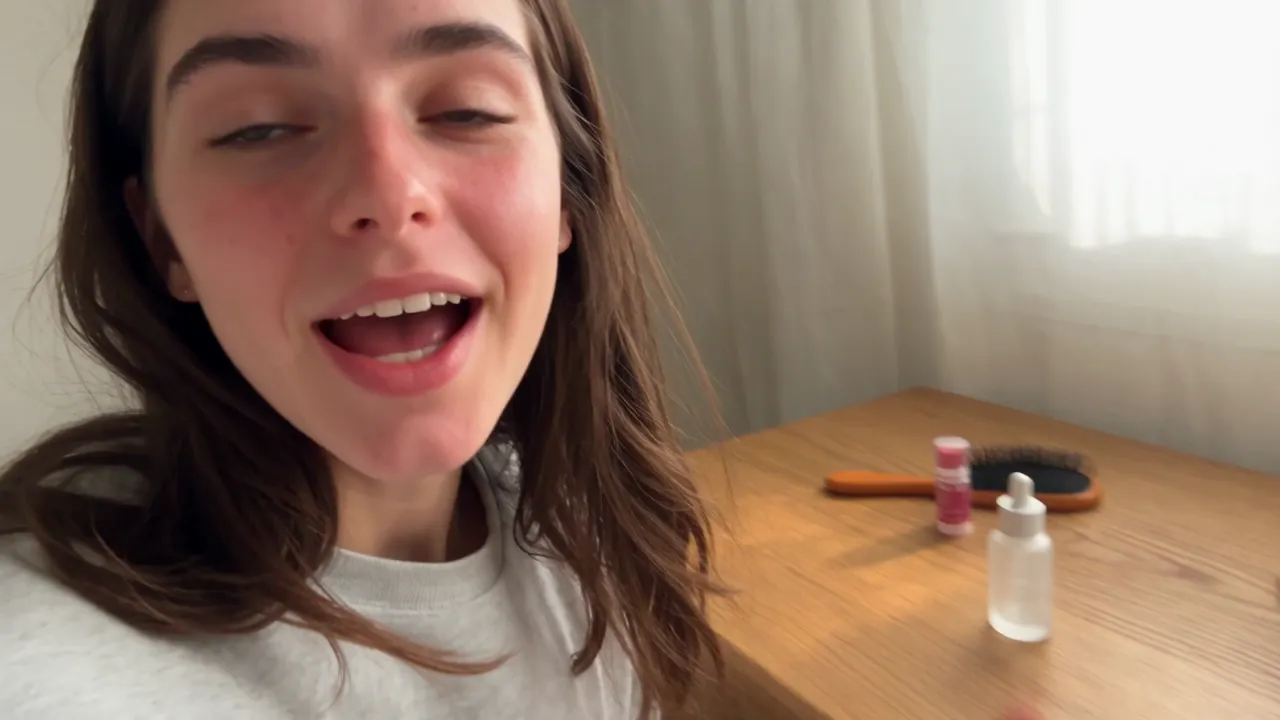
Video
Prompt
<<<image_1>>> = the woman. Use the reference only for her identity, face, and body shape. Disregard the clothing in the reference. Create a realistic 15-second casual UGC vlog-style skincare video based on the first frame and 16-panel storyboard reference image. The video should feel like a normal morning routine filmed on an iPhone, where the creator casually uses the serum and briefly mentions it, not like a scripted advertisement. Keep the same woman from the reference photo, same casual home setting, and same small frosted glass serum bottle consistent throughout the video. The product should appear naturally on the desk, in her hand, or near the mirror, but it should not be treated like a perfect commercial hero object in every shot. The 16-panel storyboard image is only a visual reference for camera angles, casual movement, product placement, facial expressions, and authentic UGC mood. Do not generate a split-screen video, do not show grid lines, and do not recreate the 16-panel layout in the final video. Use varied iPhone-style camera movement: handheld selfie opening, table-height wide shot, over-the-shoulder mirror angle, casual push-in, close-up of opening the bottle, quick texture shot, mirror application shot, tabletop sliding B-roll, low table-level foreground shot, and final casual pull-back. Keep the framing slightly imperfect and natural. Dialogue: 0:00- 0:03: "I'm just getting ready, but I wanted to show you this." 0:03-0:06: "I've been using it for a few mornings now." 0:06-0:09: "It feels really light, not sticky." 0:09-0:12: "I just use a tiny bit before makeup." 0:12-0:15: "Honestly, it's been easy to keep in my routine." Avoid polished advertising style, scripted sales tone, perfect model posing, over- centered product shots, luxury commercial lighting, plastic skin, over-smoothed face, extra people, extra bottles, text, logo, watermark, and fake readable brand text.
Core Features of Seedance 2.5 Flash AI Video Generator
Create music visuals with sound from a text prompt, a first frame, or reference media.
Text-to-Video Generation
Turn detailed prompts into video while directing subjects, action, environment, camera movement, composition, lighting, pacing, and visual style.
One-to-Two-Image Guidance
Upload a first frame to set the opening composition. Add a last frame to guide how the shot ends.
Reference-to-Video
Use images, footage, or audio to guide a scene. Mix the media types or use a song clip or voice recording as your only reference.
Video with Sound
Generate a video with sound in text-to-video, image-to-video, or reference-to-video mode.
Advantages of Seedance 2.5 Flash AI Video Generator
Draft music visuals from a prompt, frame images, or reference media and choose a clip length and resolution for your edit.
Prompt and Image Flexibility
Start from text when building a scene from scratch, or add one or two images when visual composition and transition direction matter.
Longer Creative Sequences
Choose durations up to 30 seconds for music visuals, narrative beats, campaign drafts, and connected motion ideas that need more time to develop.
Audio-Ready Video Drafts
Review the scene and its generated sound together to judge the mood and pacing before you edit.
Efficient Output Choices
Use 480p for a preview and select 1080p or 4K when the final edit calls for a higher-resolution clip.
Application Scenarios of Seedance 2.5 Flash AI Video Generator
Seedance 2.5 Flash supports music visuals, creator content, product marketing, and cinematic concepts that benefit from prompt direction, image guidance, and audio support.
Music Videos and Visualizers
Build a visualizer with a song clip as the only reference, or pair it with cover art or performance footage to guide the look.
Short-Form Social Content
Create vertical hooks, creator-style scenes, campaign teasers, and story beats for TikTok, Reels, YouTube Shorts, and social promotion.
Advertising and Product Stories
Produce product reveals, branded scenes, ecommerce clips, promotional concepts, and campaign drafts from prompts or source images.
Cinematic Concepts
Explore expressive shots, visual transitions, trailers, atmosphere pieces, and previsualization clips with detailed camera, lighting, pacing, and sound direction.
Explore Seedance 2.5 Flash AI Video Creations on Twitter
Discover Seedance 2.5 Flash experiments shared by creators, including prompt-led scenes, image-guided motion, cinematic transitions, social concepts, and audio-enabled video drafts.

More ideas to try. Less time waiting. ⚡ Introducing Dreamina Seedance 2.5 Flash: results close to flagship Seedance 2.5, with nearly twice the generation speed. For 720p text-to-video and image-to-video generation, pricing is USD 0.152 per second, approximately 34% lower than

Seedance 2.5 vs Gemini Omni 1.2 Flash I put them side by side. Watch both clips and tell me which shot you’d keep in the edit. 🎬 I tried to run a few more tests, but I keep hitting a wall with Omni 1.2 Flash. Generated with Topview AI (link in bio)

ByteDance's Seedance 2.5 Flash: 2x faster video generation, ~$0.148/sec for 720P text- and image-to-video — ~34% cheaper than Seedance 2.5. Volcano Engine says it's the closest yet to 2.5 quality, at a lower creation cost.

How to Use Seedance 2.5 Flash AI Video Generator
Choose your input, set the output options, then generate and review the clip.
Choose Your Input
Enter a text prompt, upload a first frame with an optional last frame, or add images, video, or audio in Reference-to-Video. Audio can be the only reference.
Choose Output Settings
Set the resolution and clip length. Aspect ratio selection is available only in Text-to-Video and Reference-to-Video.
Generate, Review, and Refine
Generate the clip and review the visuals and sound. Adjust the prompt, frames, or reference media for another version.

Explore More AI Creative Tools Related to Seedance 2.5 Flash
Discover more AI video, image, and music tools for creator content, music visuals, advertising, storytelling, and multimedia production workflows.
Creative Suite
Music AI

AI Song Generator

AI Song Cover Generator

Music Video Generator

Text to Music

Audio to Music

Image to Music

Lyrics to Song

AI Voice Changer

Mureka Music AI

AI Rap Generator

Piano Music Maker

AI Instrumental Maker
AI Country Generator

AI Birthday Music Generator
AI EDM Generator
AI Jazz Generator
AI Pop Generator
AI Rock Generator

AI Beat Music Generator

AI Dance Pop Music Generator

Phonk Music Maker
Background Music Generator
Classical Music Generator

AI Lyrics Generator

AI Music Extender

AI Vocal Remover

Music to MIDI

Singing Voice Generator
Udio AI Music Maker
AI Voice Maker
Video & Image AI
Free Tools

Audio to MIDI Converter

MIDI Editor

Music to Text

AI Music Checker

Free Audio Converter

Batch Audio to MIDI

Batch AI Music Checker

Lo-Fi Song Maker

MP3 Tag Editor Online
Free Suno AI Music Detector
Free MiniMax H3
Free Image to Video
Free Text to Video
Free ChatGPT Images 2.5
Free Short Music Video Generator
AI Slop Tracker
Free Music Generator
Discover