Dreamina Seedance 2.5 Flash Now Available! Faster generation, fewer credits. Introducing Dreamina Seedance 2.5 Flash - Shorter wait times, and lower cost for high-frequency creation and multi-version testing, ideal for batch generation and repeated refinement. Try it now on
支援原生音訊的 Seedance 2.5 Flash AI 音樂影片生成器
將一句歌詞、封面圖片、參考影片或一段音訊轉化為副歌畫面、藝人預告或歌曲發行影片的場景。
Seedance 2.5 Flash AI 影片生成器介紹
靈活運用文字或圖片生成影片,並可視需要生成原生音訊。
用一句歌詞描述表演場景,以上傳的第一個影格設定構圖,或用參考影片或音訊引導下一個鏡頭。
Seedance 2.5 Flash AI 影片生成範例
看看 Seedance 2.5 Flash 如何將提示詞和來源圖片轉成富有表現力的影片片段,依需求控制動作、維持畫面連貫、靈活取景並生成音訊。
原始圖片
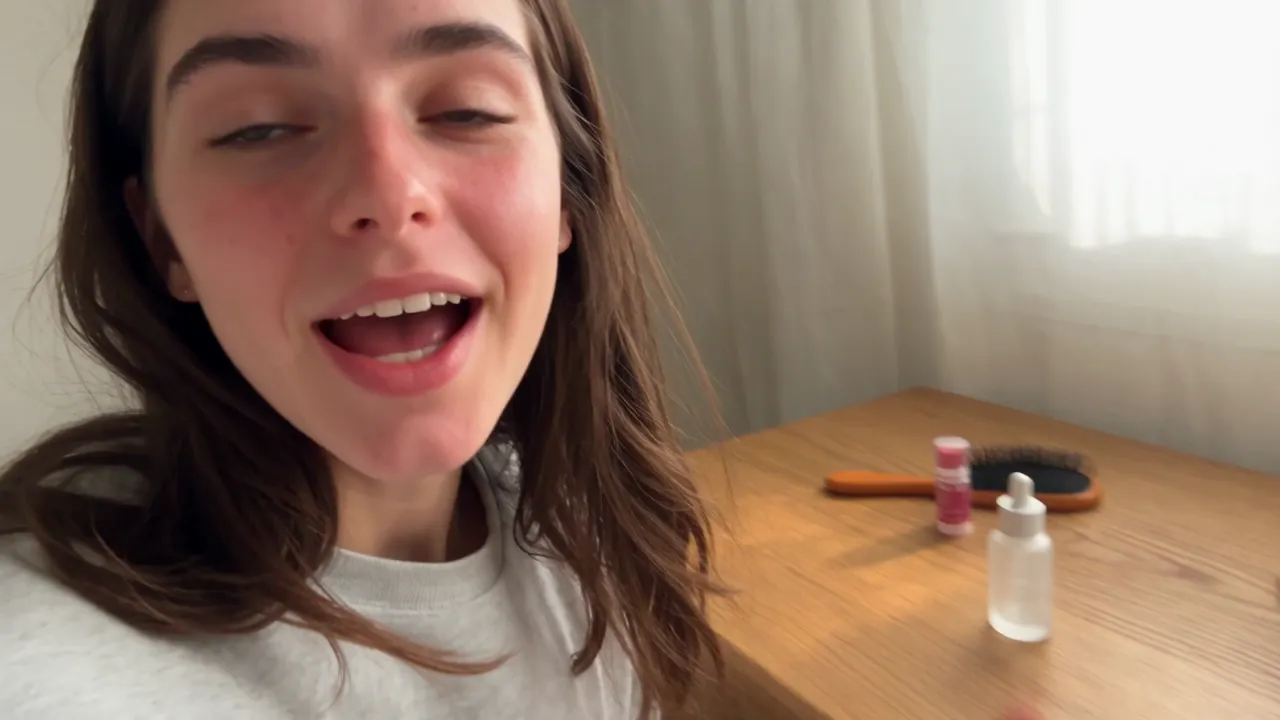
影片
提示
<<<image_1>>> = the woman. Use the reference only for her identity, face, and body shape. Disregard the clothing in the reference. Create a realistic 15-second casual UGC vlog-style skincare video based on the first frame and 16-panel storyboard reference image. The video should feel like a normal morning routine filmed on an iPhone, where the creator casually uses the serum and briefly mentions it, not like a scripted advertisement. Keep the same woman from the reference photo, same casual home setting, and same small frosted glass serum bottle consistent throughout the video. The product should appear naturally on the desk, in her hand, or near the mirror, but it should not be treated like a perfect commercial hero object in every shot. The 16-panel storyboard image is only a visual reference for camera angles, casual movement, product placement, facial expressions, and authentic UGC mood. Do not generate a split-screen video, do not show grid lines, and do not recreate the 16-panel layout in the final video. Use varied iPhone-style camera movement: handheld selfie opening, table-height wide shot, over-the-shoulder mirror angle, casual push-in, close-up of opening the bottle, quick texture shot, mirror application shot, tabletop sliding B-roll, low table-level foreground shot, and final casual pull-back. Keep the framing slightly imperfect and natural. Dialogue: 0:00- 0:03: "I'm just getting ready, but I wanted to show you this." 0:03-0:06: "I've been using it for a few mornings now." 0:06-0:09: "It feels really light, not sticky." 0:09-0:12: "I just use a tiny bit before makeup." 0:12-0:15: "Honestly, it's been easy to keep in my routine." Avoid polished advertising style, scripted sales tone, perfect model posing, over- centered product shots, luxury commercial lighting, plastic skin, over-smoothed face, extra people, extra bottles, text, logo, watermark, and fake readable brand text.
Seedance 2.5 Flash AI 影片生成器的核心功能
用文字提示詞、第一個影格或參考素材製作有聲的音樂影像。
文字生成影片
將詳細的提示詞轉為影片,指定主體、動作、環境、運鏡、構圖、燈光、節奏和視覺風格。
用一至兩張圖片引導生成
上傳第一個影格來設定開場構圖,再加入最後一個影格來引導鏡頭如何收尾。
參考素材生成影片
用圖片、影片或音訊引導場景。你可以混合使用不同類型的素材,也可以只用一段歌曲或人聲錄音作為參考。
生成有聲影片
在文字生成影片、圖片生成影片或參考素材生成影片模式中製作有聲影片。
Seedance 2.5 Flash AI 影片生成器的優勢
透過提示詞、影格圖片或參考素材製作音樂影像初稿,並依剪輯需求選擇片段長度和解析度。
靈活使用提示詞與圖片
從頭構思場景時,可以先輸入文字。若想指定構圖或轉場走向,可加入一至兩張圖片。
較長的創作片段
若音樂影像、故事段落、宣傳初稿或連貫動作的構想需要更多鋪陳時間,可選擇最長 30 秒的片段。
帶有聲音的影片初稿
剪輯前可一起預覽場景與生成的聲音,確認氛圍和節奏是否合適。
依需求選擇輸出解析度
預覽可用 480p;若最終剪輯需要更高解析度,可選擇 1080p 或 4K。
Seedance 2.5 Flash AI 影片生成器的應用情境
Seedance 2.5 Flash 透過提示詞、圖片引導和音訊支援,協助製作音樂影像、創作者內容、產品行銷素材與電影感構想。
音樂影片與音樂視覺化
只用一段歌曲就能製作音樂視覺化影片,也可以搭配封面設計或表演影像來引導視覺風格。
社群短影音
為 TikTok、Reels、YouTube Shorts 和社群宣傳製作吸睛的直式開場、創作者風格場景、宣傳預告和故事段落。
廣告與產品故事
根據提示詞或來源圖片製作新品亮相影片、品牌場景、電商短片、推廣概念和宣傳初稿。
電影感構想
運用細緻的運鏡、燈光、節奏與聲音設計,探索富有表現力的鏡頭、視覺轉場、預告片、氛圍短片和預視片段。
在 Twitter 探索 Seedance 2.5 Flash AI 影片作品
看看創作者分享的 Seedance 2.5 Flash 實驗作品,包括以提示詞生成的場景、由圖片引導的動作、電影感轉場、社群內容構想和有聲影片初稿。

More ideas to try. Less time waiting. ⚡ Introducing Dreamina Seedance 2.5 Flash: results close to flagship Seedance 2.5, with nearly twice the generation speed. For 720p text-to-video and image-to-video generation, pricing is USD 0.152 per second, approximately 34% lower than

Seedance 2.5 vs Gemini Omni 1.2 Flash I put them side by side. Watch both clips and tell me which shot you’d keep in the edit. 🎬 I tried to run a few more tests, but I keep hitting a wall with Omni 1.2 Flash. Generated with Topview AI (link in bio)

ByteDance's Seedance 2.5 Flash: 2x faster video generation, ~$0.148/sec for 720P text- and image-to-video — ~34% cheaper than Seedance 2.5. Volcano Engine says it's the closest yet to 2.5 quality, at a lower creation cost.

如何使用 Seedance 2.5 Flash AI 影片生成器
選擇輸入方式,設定輸出選項,再生成並預覽片段。
選擇輸入方式
輸入文字提示詞、上傳第一個影格並視需要加入最後一個影格,或在參考素材生成影片模式中加入圖片、影片或音訊。也可以只用音訊作為參考。
選擇輸出設定
設定解析度和片段長度。只有文字生成影片和參考素材生成影片模式支援選擇寬高比。
生成、預覽與調整
生成片段後,預覽畫面並試聽聲音。調整提示詞、影格或參考素材,即可製作另一個版本。

探索更多與 Seedance 2.5 Flash 相關的 AI 創作工具
探索更多 AI 影片、圖片和音樂工具,用於創作者內容、音樂影像、廣告、敘事與多媒體製作。

音樂製作 AI




















免費工具









探索