Dreamina Seedance 2.5 Flash Now Available! Faster generation, fewer credits. Introducing Dreamina Seedance 2.5 Flash - Shorter wait times, and lower cost for high-frequency creation and multi-version testing, ideal for batch generation and repeated refinement. Try it now on
네이티브 오디오를 지원하는 Seedance 2.5 Flash AI 뮤직비디오 생성기
가사 한 구절, 커버 이미지, 참고 동영상 또는 오디오 클립으로 후렴구 영상, 아티스트 티저 또는 음원 발매용 장면을 만들어 보세요.
Seedance 2.5 Flash AI 동영상 생성기 소개
텍스트나 이미지로 동영상을 자유롭게 만들고, 필요에 따라 오디오도 함께 생성할 수 있습니다.
가사 한 구절로 공연 장면을 묘사하거나 첫 프레임으로 구도를 잡으세요. 참고 영상이나 오디오로 다음 숏을 연출할 수도 있습니다.
Seedance 2.5 Flash AI 동영상 생성 예시
Seedance 2.5 Flash가 프롬프트와 원본 이미지를 표현력 있는 영상으로 바꾸는 방법을 살펴보세요. 움직임을 지정하고 장면의 연속성을 유지하면서 화면 구도를 유연하게 잡고 오디오를 생성할 수 있습니다.
원본 이미지
동영상
프롬프트
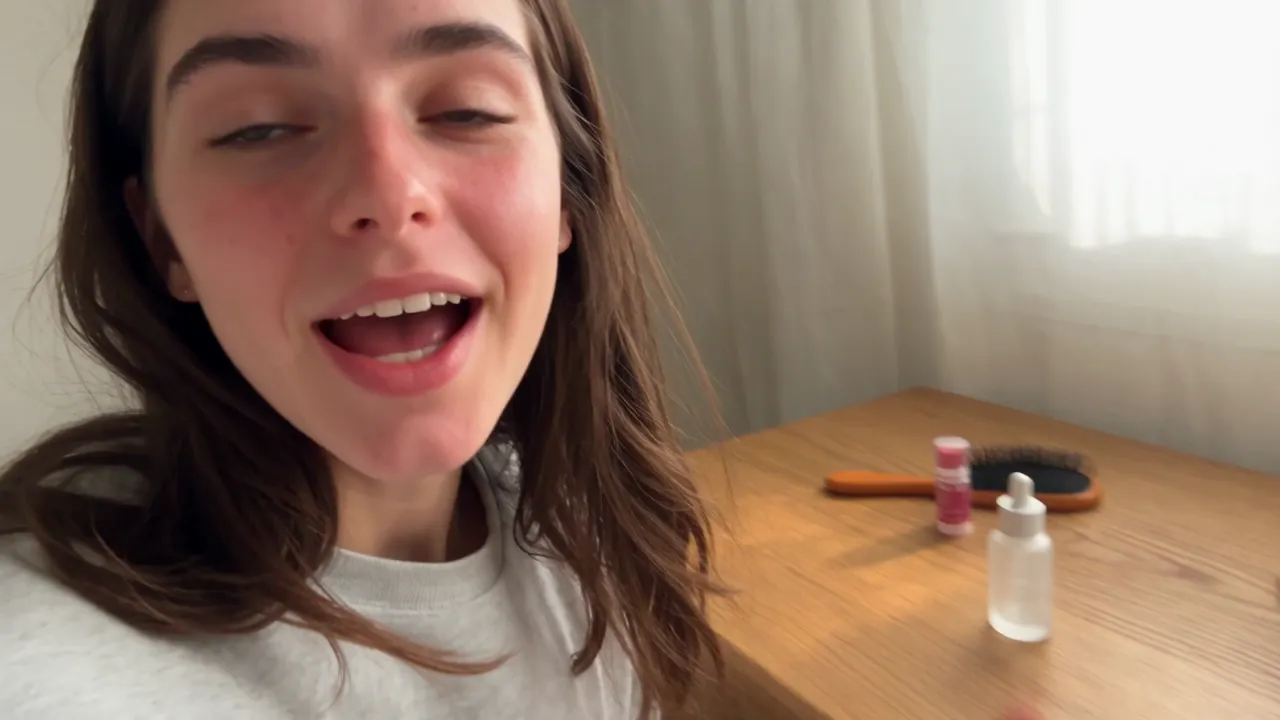
<<<image_1>>> = the woman. Use the reference only for her identity, face, and body shape. Disregard the clothing in the reference. Create a realistic 15-second casual UGC vlog-style skincare video based on the first frame and 16-panel storyboard reference image. The video should feel like a normal morning routine filmed on an iPhone, where the creator casually uses the serum and briefly mentions it, not like a scripted advertisement. Keep the same woman from the reference photo, same casual home setting, and same small frosted glass serum bottle consistent throughout the video. The product should appear naturally on the desk, in her hand, or near the mirror, but it should not be treated like a perfect commercial hero object in every shot. The 16-panel storyboard image is only a visual reference for camera angles, casual movement, product placement, facial expressions, and authentic UGC mood. Do not generate a split-screen video, do not show grid lines, and do not recreate the 16-panel layout in the final video. Use varied iPhone-style camera movement: handheld selfie opening, table-height wide shot, over-the-shoulder mirror angle, casual push-in, close-up of opening the bottle, quick texture shot, mirror application shot, tabletop sliding B-roll, low table-level foreground shot, and final casual pull-back. Keep the framing slightly imperfect and natural. Dialogue: 0:00- 0:03: "I'm just getting ready, but I wanted to show you this." 0:03-0:06: "I've been using it for a few mornings now." 0:06-0:09: "It feels really light, not sticky." 0:09-0:12: "I just use a tiny bit before makeup." 0:12-0:15: "Honestly, it's been easy to keep in my routine." Avoid polished advertising style, scripted sales tone, perfect model posing, over- centered product shots, luxury commercial lighting, plastic skin, over-smoothed face, extra people, extra bottles, text, logo, watermark, and fake readable brand text.
Seedance 2.5 Flash AI 동영상 생성기의 주요 기능
텍스트 프롬프트, 첫 프레임 또는 참고 자료에서 시작해 소리가 있는 음악 영상을 만들어 보세요.
텍스트로 동영상 생성
상세 프롬프트를 동영상으로 만들면서 피사체, 동작, 배경, 카메라 움직임, 구도, 조명, 전개 속도, 시각적 스타일을 지정하세요.
이미지 한두 장으로 장면 연출
첫 프레임을 업로드해 시작 구도를 정하고, 마지막 프레임을 추가해 숏을 어떻게 마무리할지 지정할 수 있습니다.
참고 자료로 동영상
이미지, 영상 또는 오디오를 참고해 장면을 연출하세요. 여러 유형의 자료를 섞거나 노래 일부나 음성 녹음만 참고 자료로 사용할 수 있습니다.
소리가 있는 동영상
텍스트로 동영상, 이미지로 동영상, 참고 자료로 동영상의 세 모드에서 소리가 있는 영상을 생성할 수 있습니다.
Seedance 2.5 Flash AI 동영상 생성기의 장점
프롬프트, 프레임 이미지 또는 참고 자료로 음악 영상 초안을 만들고 편집에 맞는 길이와 해상도를 선택하세요.
프롬프트와 이미지의 자유로운 활용
장면을 처음부터 구상할 때는 텍스트로 시작하고, 구도와 장면 전환 방식을 지정하려면 이미지를 한두 장 추가하세요.
더 긴 영상 제작
음악 영상, 이야기의 한 대목, 캠페인 초안 또는 이어지는 동작을 충분히 전개하려면 최대 30초까지 설정할 수 있습니다.
소리가 포함된 영상 초안
편집하기 전에 장면과 생성된 소리를 함께 확인하며 분위기와 전개 속도를 살펴보세요.
용도에 맞는 출력 해상도
미리보기에는 480p를 사용하고 최종 편집에 고해상도 영상이 필요하면 1080p나 4K를 선택하세요.
Seedance 2.5 Flash AI 동영상 생성기 활용 사례
Seedance 2.5 Flash는 프롬프트, 이미지, 오디오를 활용해 음악 영상, 크리에이터 콘텐츠, 제품 마케팅 영상과 영화풍 콘셉트를 만들 수 있도록 지원합니다.
뮤직비디오와 음악 비주얼라이저
노래 일부만을 참고해 음악 비주얼라이저를 만들 수 있습니다. 커버 아트나 공연 영상으로 원하는 시각적 분위기를 지정할 수도 있습니다.
소셜 미디어 숏폼 콘텐츠
TikTok, Reels, YouTube Shorts와 소셜 미디어 홍보용으로 시선을 끄는 세로 영상의 도입부, 크리에이터 스타일의 장면, 캠페인 티저와 이야기의 주요 장면을 만들어 보세요.
광고와 제품 이야기
프롬프트나 원본 이미지로 신제품 공개 영상, 브랜드 장면, 쇼핑몰용 클립, 홍보 콘셉트와 캠페인 초안을 제작하세요.
영화풍 콘셉트
카메라 움직임, 조명, 전개 속도와 소리를 세밀하게 연출해 표현력 있는 숏, 화면 전환, 예고편, 분위기를 담은 영상과 사전 시각화 클립을 제작해 보세요.
Twitter에서 Seedance 2.5 Flash AI 영상 작품 보기
크리에이터들이 공유한 Seedance 2.5 Flash 실험작을 살펴보세요. 프롬프트로 연출한 장면, 이미지로 지정한 움직임, 영화풍 전환, 소셜 미디어용 콘셉트, 소리가 있는 영상 초안을 볼 수 있습니다.

More ideas to try. Less time waiting. ⚡ Introducing Dreamina Seedance 2.5 Flash: results close to flagship Seedance 2.5, with nearly twice the generation speed. For 720p text-to-video and image-to-video generation, pricing is USD 0.152 per second, approximately 34% lower than

Seedance 2.5 vs Gemini Omni 1.2 Flash I put them side by side. Watch both clips and tell me which shot you’d keep in the edit. 🎬 I tried to run a few more tests, but I keep hitting a wall with Omni 1.2 Flash. Generated with Topview AI (link in bio)

ByteDance's Seedance 2.5 Flash: 2x faster video generation, ~$0.148/sec for 720P text- and image-to-video — ~34% cheaper than Seedance 2.5. Volcano Engine says it's the closest yet to 2.5 quality, at a lower creation cost.

Seedance 2.5 Flash AI 동영상 생성기 사용 방법
입력 방식을 고르고 출력 옵션을 설정한 뒤 클립을 생성하고 확인하세요.
입력 방식 선택
텍스트 프롬프트를 입력하거나 첫 프레임을 업로드하고 필요하면 마지막 프레임을 추가하세요. 참고 자료로 동영상 모드에서는 이미지, 동영상 또는 오디오를 추가할 수 있으며 오디오만 참고 자료로 써도 됩니다.
출력 설정 선택
해상도와 클립 길이를 설정하세요. 화면 비율은 텍스트로 동영상과 참고 자료로 동영상 모드에서만 선택할 수 있습니다.
생성하고 확인한 뒤 조정하기
클립을 생성하고 화면과 소리를 확인하세요. 다른 버전을 만들려면 프롬프트, 프레임 또는 참고 자료를 조정하세요.

Seedance 2.5 Flash 관련 AI 창작 도구 더 보기
크리에이터 콘텐츠, 음악 영상, 광고, 스토리텔링, 멀티미디어 제작에 사용할 AI 동영상, 이미지, 음악 도구를 살펴보세요.
AI 음악 메이커

AI 노래 생성기

AI 노래 커버 생성기

AI 뮤직 비디오 생성기

텍스트로 음악 만들기

오디오로 음악 만들기

이미지로 음악 만들기

가사로 노래 만들기

AI 보이스 변환기

Mureka Music AI

AI 랩 생성기

피아노 음악 메이커

AI 반주 생성기
AI 컨트리 제너레이터

AI 생일 음악 생성기
EDM 생성
AI 재즈 제너레이터
AI 팝 제너레이터
AI 록 제너레이터

비트 생성

댄스 팝

Phonk 음악 제작 도구
배경음악 생성기
클래식 음악 생성기

AI 가사 생성기

AI 음악 연장기

AI 보컬 제거기

음악을 MIDI로

AI 노래 음성 생성기
Udio AI 음악 제작 도구
AI 음성 제작 도구
비디오 및 이미지 AI
무료 도구









탐색