Preparing your creative workspace...
AI Photo to Rap Video Generator: Visualize Your Recorded Verse
Turn your portrait and recorded verse into a rap performance with Music Maker. Upload a performer photo and rap audio, then choose from five scene hints or describe your own setting. Create track previews, release teasers, artist introductions, and clips for a longer music video.
Photo to Rap Performance Examples for Your Next Verse
Preview a studio session and a rooftop performance built from photo and audio references. Try the example materials, then replace them with your portrait and recorded verse.
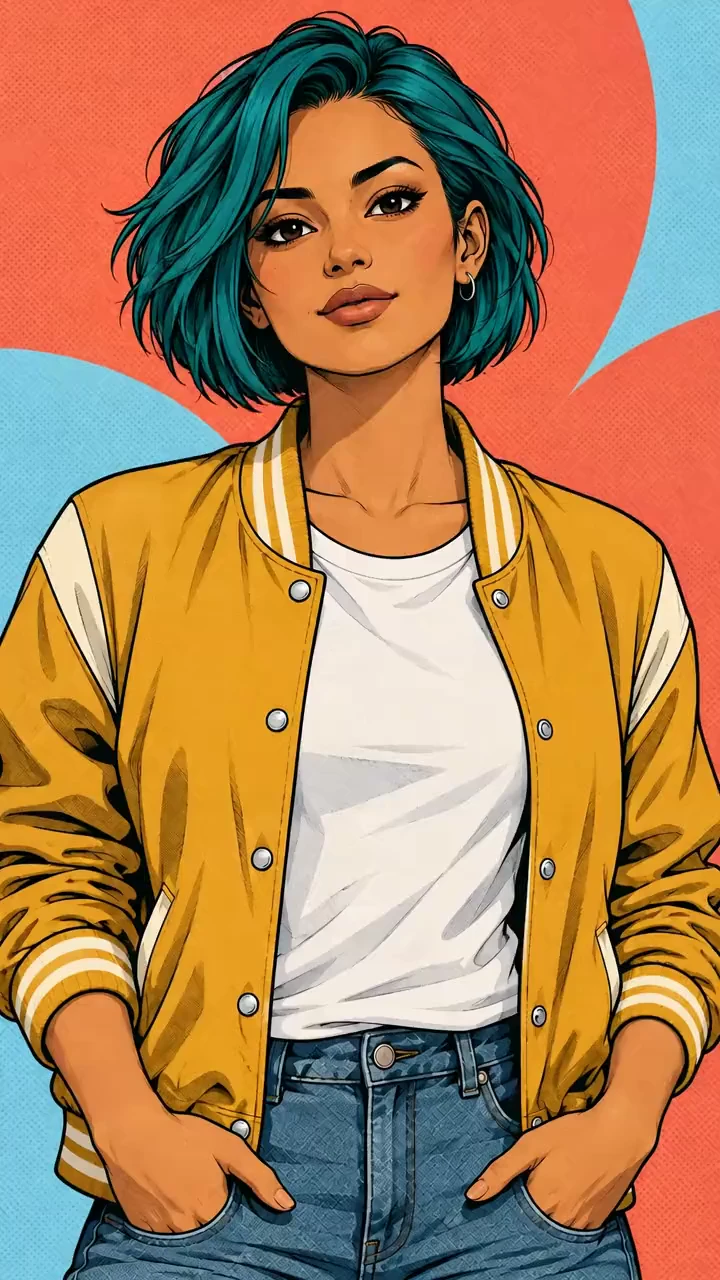
Use <<<image_1>>> as the exact reference for ONE adult comic woman. Preserve teal bob, tan skin, dark eyes, hoop earring, yellow jacket, proportions, coral-blue backdrop and bold ink lines. 10s vertical 9:16, vibrant full color. Animate entirely as hand-drawn 2D cel art with stable outlines and halftone shading; never become real or 3D. Fixed frontal waist-up shot. Keep mouth large and unobstructed; hands stay low. Small head nods, shoulder pulses, brow lifts and one compact palm accent. Hair tips and jacket folds follow gently; no large body movement or background change. Original 120 BPM 4/4 bright hip-hop: punchy kick, snappy snare, syncopated hats, warm bass and short synth-brass stabs. One confident adult female rap voice, crisp consonants, playful attitude, rhythmic delivery rather than speech or singing. Audible instrumental from frame one, below clear lead vocals through the ending. 0-0.5s: Mouth closed, one preparatory nod. 0.5-2.5s: "INK on my SLEEVE / light in my EYES." Brow lift and two head dips. 2.5-4.5s: "STEP off the PAGE / I claim the PRIZE." One low palm accent; stay in place. 4.5-6.5s: "BOLD lines, bright MIND / I make them GLOW." Subtle shoulder groove. 6.5-8.5s: "MY own STYLE / my own FLOW." Confident eye contact and nod. 8.5-10s: Vocals stop, mouth closes, small satisfied smile; beat continues. Synchronize drawn lips, cheeks and jaw to every audible syllable, with clear closures and vowel shapes. Only quoted lyrics; slashes silent, capitals accented. Single continuous shot, one subject and one voice. No duet, backing vocals, narration, subtitles, lettering, extra figures, identity drift or extra limbs. Generate audible rap AND instrumental, never silent mime.
Turn Your Portrait and Rap Recording into a Performance Scene
Bring the performer, verse, and visual direction together. Use audio references for timing and a prompt for the location, gestures, and camera view.
A Performer Based on Your Portrait
Upload an artist photo or character image with a clear face. Describe the appearance and clothing details you want carried into the performance.
Rap Audio to Guide the Delivery
Add a recording through a supported reference model. Preview and trim the section you want to visualize, then use it to guide the verse rhythm and phrasing.
Visual Direction for Your Track
Describe an intimate studio take, an open rooftop, or another performance setting. Adjust the lighting and camera style to suit the recording.
Examples with Photos, Audio, and Prompts
Load a performance example to explore the complete starting materials. Replace its image and recording while adapting the scene direction.
Create Rap Performance Videos for Your Music Releases
Use Music Maker to turn an artist portrait and rap recording into a video for track promotion. Customize the scene and performance, then download a clip for your release content.
Start from Your Existing Music Materials
Generate a performance from an artist portrait and recording without capturing new live footage. Use the result in a track preview, artist introduction, or social music video.
Keep the Recorded Verse at the Center
Let the audio communicate cadence and delivery. Use your prompt to describe the visual action around the performance.
Try Different Looks for the Same Recording
Explore different locations, lighting, and gestures with the same portrait and verse. Compare which direction fits the music best.
Performance Clips for Release Content
Use a selected take in an artist introduction, track preview, or social edit. Review the vocal timing, face, and sound before publishing.
Photo to Rap Video Ideas for Track Releases and Artist Promotion
Turn a recorded verse into release previews, artist introductions, personal dedications, and music video clips.
New Track and Verse Previews
Turn a section of an upcoming recording into a short performance clip for release announcements, Reels, or Shorts.
Artist Profile and Introduction Videos
Pair an artist portrait with a verse that represents their sound. Choose a visual setting that supports the performer identity.
Personal Rap Dedications
Create a performance for a recorded birthday message, dedication, or shout-out using a matching portrait and scene prompt.
Rap Performance Clips for Music Videos
Generate performances in different settings for the same recording. Choose your favorite takes and combine them in a longer music video edit.
How to Create a Photo to Rap Performance with Music Maker
Add your performer photo and rap recording, set the scene, and generate a performance to review.
1. Choose a Portrait and Recorded Verse
Open a Rap example or add your own image and recording. Preview the audio and trim a section that fits the selected model limits.
2. Set the Scene for Your Performance
Describe the location, lighting, camera view, and gestures. Review the video settings and displayed credit cost, then generate the clip.
3. Listen, Preview, and Download
Review the face, mouth movement, and sound in your result. Download the performance or adjust the prompt to try another interpretation of the verse.

More AI Tools for Your Music
Write lyrics, develop a rap track, and explore more ways to bring your performance to video.
Creative Suite
Music AI

AI Song Generator
AI Song Cover Generator
Music Video Generator
Text to Music
Audio to Music

Image to Music

Lyrics to Song
AI Voice Changer

Mureka Music AI

AI Rap Generator

Piano Music Maker

AI Instrumental Maker
AI Country Generator
AI Birthday Music Generator
AI EDM Generator
AI Jazz Generator
AI Pop Generator
AI Rock Generator

AI Beat Music Generator

AI Dance Pop Music Generator

Phonk Music Maker
AI Lyrics Generator

AI Music Extender

AI Vocal Remover

Music to MIDI
Singing Voice Generator
Udio AI Music Maker
AI Voice Maker
Video & Image AI
Free Tools

Audio to MIDI Converter

MIDI Editor
Music to Text

AI Music Checker
Free Audio Converter

Batch Audio to MIDI

Batch AI Music Checker
Lo-Fi Song Maker
MP3 Tag Editor Online
Free Suno AI Music Detector
Free MiniMax H3
Free Image to Video
Free Text to Video
Free ChatGPT Images 2.5
Free Short Music Video Generator
AI Slop Tracker
Discover