Seedance 2.5 AI Music Video Generator with Native Audio

Create 5-to-30-second AI music videos from text or one-to-two images with Seedance 2.5. Choose 480p or 720p output, use flexible text-to-video aspect ratios, and control whether the result includes native audio.

Seedance 2.5 AI
Model Version
Prompt
Public:
Select a video from your history to play
--
--
--
Video History

Introduction to Seedance 2.5 AI Video Generator

Explore flexible text-to-video and image-to-video creation with optional native audio.

Seedance 2.5 turns detailed prompts or one-to-two source images into polished video clips. Choose the workflow, resolution, duration, framing, and audio setting that fit music visuals, social content, marketing concepts, and cinematic ideas.

Examples of Seedance 2.5 AI Video Generation

Explore how Seedance 2.5 turns prompts and source images into expressive video clips with directed motion, visual continuity, flexible framing, and audio support.

Original Image
Preview
Video
Prompt

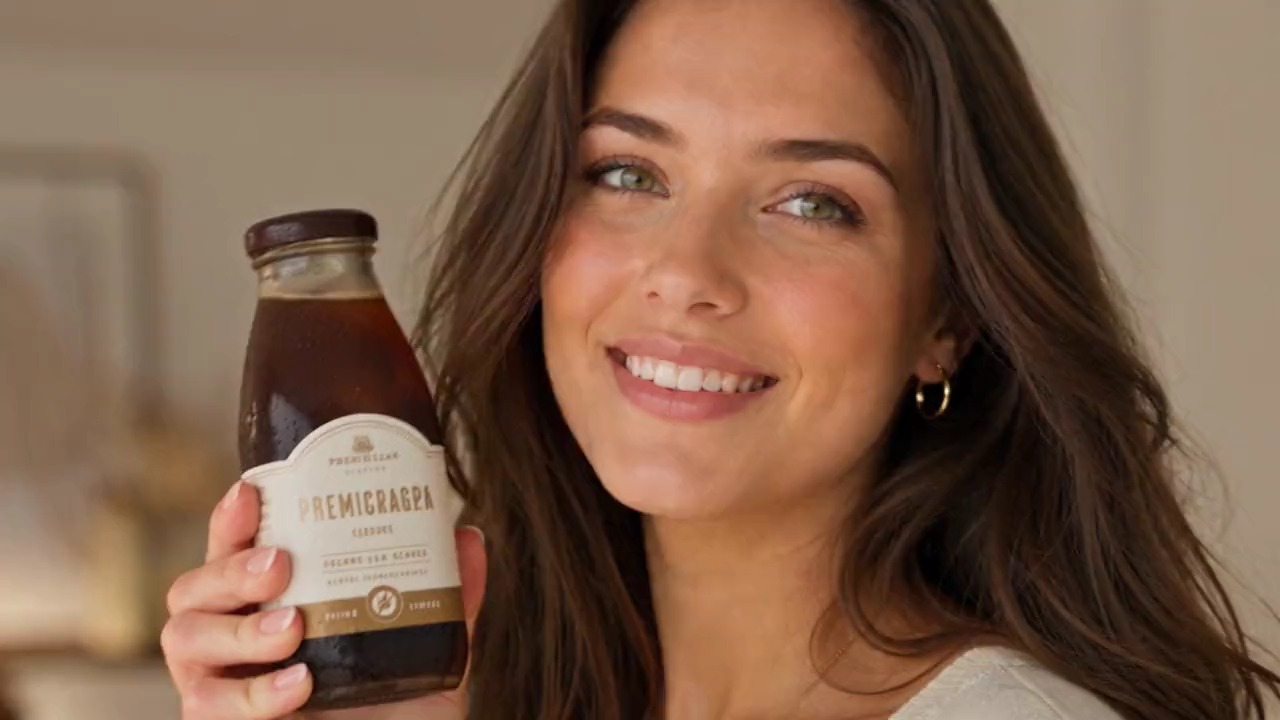
Create a 15-second vertical 16:9 premium UGC iced-coffee commercial. Use the uploaded reference image <<<image_1>>> as the exact woman in every shot; preserve her identity perfectly with natural expressions, realistic hands and no face drift. Use the same iced-coffee bottle throughout with identical branding, label, colors, packaging and cap. Setting: a warm modern apartment with soft window light, wooden surfaces, neutral cozy décor, realistic reflections, shallow depth of field, cinematic commercial lighting and luxury café color grading. Premium photorealistic coffee, ice, milk swirls and condensation. Smooth handheld/gimbal movement, quick elegant cuts. TIMELINE: 0.0–1.5s — Close-up: she smiles directly at camera, holding the chilled bottle beside her face with an excited, natural presentation. 1.5–2.7s — Clean macro: bottle standing on a wooden table; condensation beads, premium label sharp and clear. 2.7–3.7s — Extreme macro: hand slowly twists the cap open; satisfying opening motion, fresh droplets. 3.7–5.7s — Cinematic macro: rich iced coffee pours over crystal-clear ice; ice gently clinks. 5.7–7.0s — Close-up inside glass: milk blends into smooth, elegant marbled coffee swirls. 7.0–8.8s — She takes a refreshing sip, briefly closes her eyes, then smiles naturally. 8.8–10.0s — She holds the bottle toward camera and gives a confident thumbs-up. 10.0–11.5s — Fast lifestyle insert: bottle beside laptop, sunglasses and book on the wooden table. 11.5–12.8s — Brief outdoor warm-sun shot: she walks naturally holding the bottle, relaxed smile. 12.8–15.0s — Premium hero shot: bottle on wood surrounded by roasted coffee beans, warm sunlight; her hand enters beside the bottle. Slow push-in as she says: “Good coffee. Good mood. Anytime.” Fade out. Natural English lip sync. No on-screen text, subtitles, added logos beyond product packaging, watermarks, duplicate people, distorted hands, flicker, cartoon style, AI artifacts, oversaturated colors or low-resolution textures.

Core Features of Seedance 2.5 AI Video Generator

Seedance 2.5 combines prompt direction, one-to-two-image guidance, flexible clip lengths, and optional native audio in one practical video workflow.

Text-to-Video Generation

Turn detailed prompts into video while directing subjects, action, environment, camera movement, composition, lighting, pacing, and visual style.

One-to-Two-Image Guidance

Upload a starting image or add an ending image to guide the opening composition, final composition, motion, and visual transition of the generated clip.

Flexible Video Length and Resolution

Create 5, 10, 15, 20, 25, or 30-second clips in 480p or 720p for quick concepts, creator edits, and longer visual sequences.

Optional Native Audio

Keep native audio enabled for an audio-ready result, or turn it off when you plan to add music, voiceover, ambience, or custom sound design later.

Advantages of Seedance 2.5 AI Video Generator

Use Seedance 2.5 to move from a prompt or source images to flexible video drafts with controllable framing, duration, resolution, and sound.

Prompt and Image Flexibility

Start from text when building a scene from scratch, or add one or two images when visual composition and transition direction matter.

Longer Creative Sequences

Choose durations up to 30 seconds for music visuals, narrative beats, campaign drafts, and connected motion ideas that need more time to develop.

Audio-Ready Video Drafts

Generate video with native audio when you need a more complete first draft, while retaining the option to create a silent result for later sound production.

Efficient Output Choices

Use 480p for faster creative testing, then select 720p when the final concept needs more visual detail and presentation quality.

Application Scenarios of Seedance 2.5 AI Video Generator

Seedance 2.5 supports music visuals, creator content, product marketing, and cinematic concepts that benefit from prompt direction, image guidance, and audio support.

Music Videos and Visualizers

Develop performance scenes, lyric visuals, mood-driven edits, animated cover concepts, and short music-video sequences with coordinated motion and sound.

Short-Form Social Content

Create vertical hooks, creator-style scenes, campaign teasers, and story beats for TikTok, Reels, YouTube Shorts, and social promotion.

Advertising and Product Stories

Produce product reveals, branded scenes, ecommerce clips, promotional concepts, and campaign drafts from prompts or source images.

Cinematic Concepts

Explore expressive shots, visual transitions, trailers, atmosphere pieces, and previsualization clips with detailed camera, lighting, pacing, and sound direction.

Explore Seedance 2.5 AI Video Creations on Twitter

Discover Seedance 2.5 experiments shared by creators, including prompt-led scenes, image-guided motion, cinematic transitions, social concepts, and audio-enabled video drafts.

How to Use Seedance 2.5 AI Video Generator

Create a Seedance 2.5 video in three steps: choose text or image guidance, configure the available output and audio options, then generate and refine the result.

Add a Prompt or Source Images

Describe the scene for text-to-video, or upload a starting image, an ending image, or both when you want visual guidance for the generated sequence.

Choose Video and Audio Settings

Select the available duration and resolution, choose an aspect ratio for text-to-video, and decide whether the generated clip should include native audio.

Generate, Review, and Refine

Start generation, review the video and audio result, then adjust the prompt, source images, duration, resolution, or audio setting for another version.

Manual guide

Frequently Asked Questions About Seedance 2.5 AI Video Generator