


Lip Sync Video Generator: AI Talking Avatar Maker
Lip Sync Video Generator is an online AI tool that turns character images and uploaded audio into realistic talking videos. Upload a portrait, generate a character image with AI, or start from an example image, then add your audio and let AI synchronize lip movement, facial expression, and subtle motion in minutes.
Examples of Lip Sync Video Generator
Stunning examples of Lip Sync Video Generator showcase how static portraits, AI-generated character images, and prompt-based hint images can become lifelike talking avatars with natural facial expressions and realistic mouth synchronization.
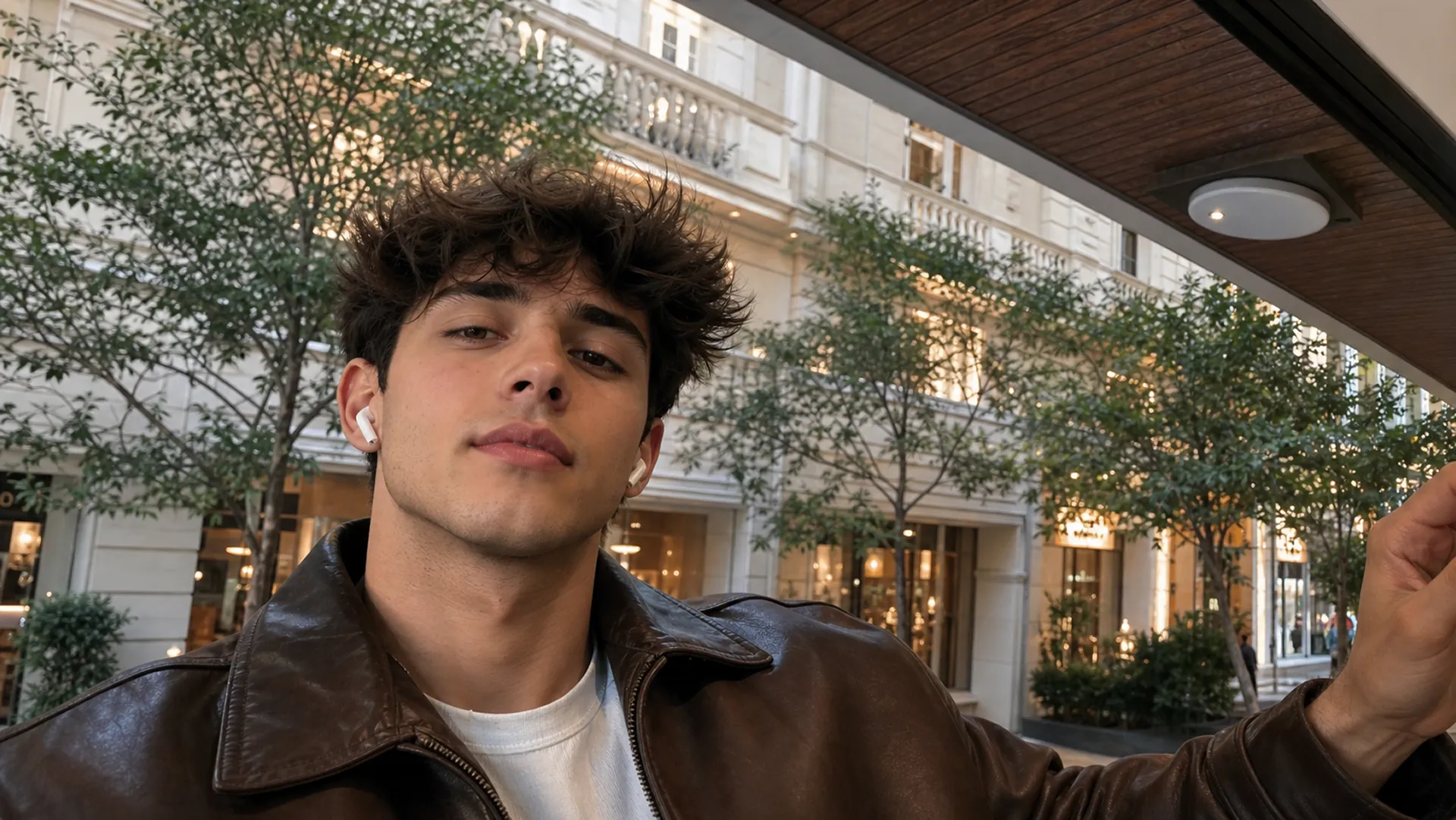
Close-up portrait of a singer performing an emotional pop chorus, natural lip sync to the uploaded music, expressive eyes, subtle head movement, soft studio lighting, cinematic music video style, realistic facial motion, no subtitles.
Core Features of Lip Sync Video Generator
Lip Sync Video Generator offers a focused audio-to-video workflow for creating talking avatars, including audio upload, image upload or AI image generation, example image selection, lip movement alignment, facial animation, and prompt-based video direction.
Audio-to-Video Generation
Upload audio, add or generate a character image, enter a short prompt, and let AI analyze the speech timing to generate a complete lip sync video.
Natural Lip Synchronization
AI aligns mouth movement and facial details with the uploaded audio, helping the character appear to speak naturally.
AI Image Generation & Hints
Upload an existing portrait, generate a new character image with AI, or choose example hint images to quickly define the face, style, and visual direction.
Flexible Prompt Control
Use prompts to guide the scene mood, camera movement, speaking style, and visual presentation so the generated lip sync video fits your content goal.
Advantages of Lip Sync Video Generator
Create talking avatar videos faster with AI-assisted audio synchronization, flexible image creation, example image guidance, and prompt control.
Faster Talking Video Creation
Turn uploaded audio and character images into polished lip sync videos without recording a new talking-head clip every time.
Natural Speaking Performance
Create synchronized lip movement, subtle facial animation, and speaking rhythm that helps a static portrait feel more lifelike.
Flexible Image Starting Points
Start from an uploaded portrait, an AI-generated character image, or an example hint image while keeping the selected character visually consistent.
Flexible Video Direction
Use prompts to adjust the scene mood, camera movement, speaking style, and visual presentation for different content goals.
Application Scenarios of Lip Sync Video Generator
Lip Sync Video Generator is suitable for talking-head content, product introductions, social media videos, online lessons, and brand messages. Quickly turn uploaded audio and selected character images into polished lip sync videos for different content needs.
Social Media Talking Videos
Create short talking avatar videos for TikTok, Instagram, YouTube Shorts, and other platforms by syncing uploaded audio with a character image.
Product Explainers & Brand Messages
Turn product scripts, announcements, and campaign audio into presenter-style videos without recording a new talking-head clip every time.
Education & Creator Content
Generate lip-synced lesson intros, narration clips, podcast highlights, and creator updates that pair clear speech with a consistent visual character.
Training & Presentation Clips
Create presenter-style clips for onboarding, internal updates, tutorials, and short presentations by pairing uploaded audio with a consistent avatar or character image.
How to Use Lip Sync Video Generator
Create an AI lip sync video in three simple steps with character image upload or AI image generation, audio upload, and a clear speaking style prompt.
Add Character Image
Upload a character image, generate one with AI, or choose an example hint image with a clear, visible face.
Upload Audio
Upload your audio and enter a video description or speaking style prompt.
Generate Talking Video
Click Generate, and AI will automatically render a talking avatar video with synchronized lip movement.
Explore More AI Creative Tools Related to Lip Sync Video Generator
Unlock the potential of AI lip sync video tools that simplify audio-driven talking avatars, AI character image creation, facial animation, and social clips. Whether you need a quick presenter video or a repeatable creator workflow, these AI-powered tools have you covered.
Music AI

AI Song Generator

AI Song Cover Generator

Music Video Generator

Text to Music

Audio to Music

Image to Music

Lyrics to Song

AI Voice Changer

Mureka Music AI

AI Rap Generator

Piano Music Maker

AI Instrumental Maker
AI Country Generator

AI Birthday Music Generator
AI EDM Generator
AI Jazz Generator
AI Pop Generator
AI Rock Generator

AI Beat Music Generator

AI Dance Pop Music Generator

Phonk Music Maker

AI Lyrics Generator

AI Music Extender

AI Vocal Remover

Music to MIDI

Singing Voice Generator
Udio AI Music Maker
AI Voice Maker
Video & Image AI
Free Tools

Audio to MIDI Converter

MIDI Editor

Music to Text

AI Music Checker

Free Audio Converter

Batch Audio to MIDI

Batch AI Music Checker

Lo-Fi Song Maker

MP3 Tag Editor Online
Free Suno AI Music Detector
Free MiniMax H3
Free Image to Video
Free Text to Video
Free ChatGPT Images 2.5
Free Short Music Video Generator
AI Slop Tracker
Discover
